
INTRODUCTION: Hostinger Review
If you’ve spent any time comparing hosting providers, you’ve probably come across Hostinger more than once. It appears on nearly every “cheapest web hosting” list. Its low starting price has also made it popular with people launching their first website. In the Hostinger Review, given some idea.
However, cheap doesn’t automatically mean good. A low advertised price rarely tells the full story. Renewal costs can also change the overall value.
So, the real question isn’t whether Hostinger is affordable. It clearly is. The bigger question is whether it delivers good value beyond the homepage pricing.
Hostinger aims to make that choice easier. It brings hosting, domains, WordPress tools, a website builder, and email services under one roof. It also offers a growing collection of AI-powered features.
What Is Hostinger?: Hostinger Review
Hostinger is a web hosting company that was founded in Lithuania in 2004. Since then, it has grown into one of the bigger names in the hosting industry. It now serves customers across many countries.
Today, Hostinger is more than a basic hosting company. It works as an all-in-one platform. You can manage hosting, domains, website building, email, and AI-powered tools from one account. It also offers automation features and AI agent products.
Hostinger is designed with beginners in mind. You don’t need technical server knowledge to get your website online. The setup process is relatively straightforward.
At the same time, Hostinger hasn’t forgotten technical users. It offers VPS hosting with full root access for developers. You can also use tools such as SSH access and staging environments. These options are useful if you prefer more control over your hosting environment.
People use Hostinger for many types of websites. Common examples include personal blogs, portfolios, small business websites, and online stores. Agencies can also use it for client websites.
More recently, Hostinger has expanded into AI-generated websites and web apps. These can be created from a simple prompt instead of starting with a blank page.

Hostinger Hosting Plans and Pricing
Hostinger’s current hosting lineup is organized around what you’re trying to do rather than a single “shared vs. VPS” split. The main options are:
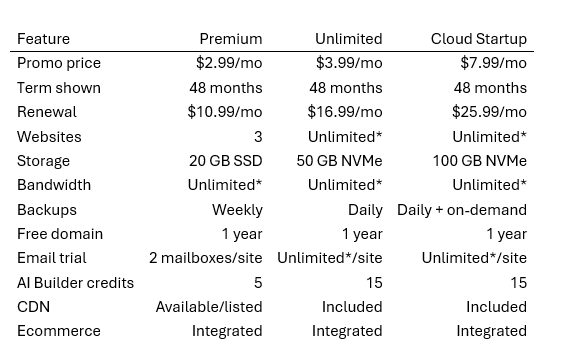
Shared/Website hosting (Premium, Unlimited, Cloud Startup) — the entry point for most personal and small business sites. These plans run on shared server infrastructure with increasing resources, storage, and backup frequency as you go up a tier.
Cloud hosting — sits above the shared tiers, aimed at higher-traffic sites and agencies that need more dedicated resources without jumping to a full VPS.
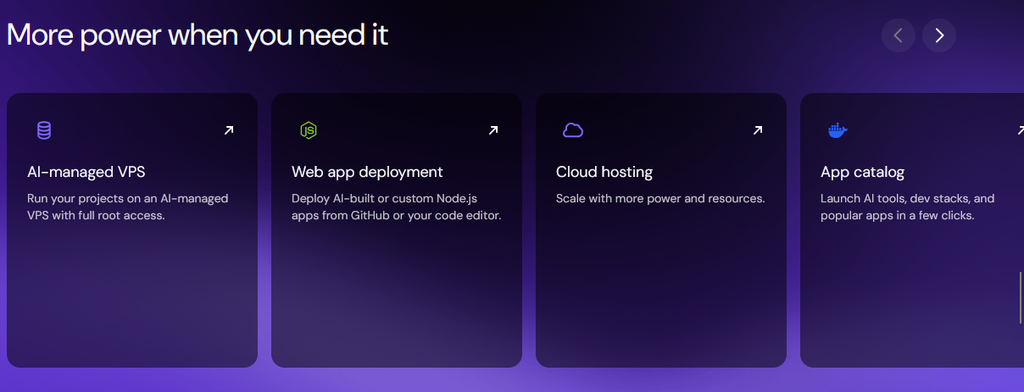
VPS hosting (KVM plans) — unmanaged virtual private servers with root access, built for developers and more technical users who want full control over their environment.
Managed hosting for WordPress — hosting tuned specifically for WordPress sites, with WordPress-specific tools and AI-assisted management baked in.
Hosting for WooCommerce and agency hosting — aimed at online stores and at agencies managing multiple client sites from one dashboard.
For a typical first website, the shared plans are the sensible starting point. If you outgrow them, upgrading to Cloud or VPS is presented as a straightforward move rather than a full migration.
Hostinger Key Features: Hostinger Review
Rather than trying to cover every single feature Hostinger lists, here’s what actually matters day-to-day for most site owners.
Website hosting and domains: Every hosting plan bundles a free domain for the first year, along with free SSL that Hostinger sets up automatically — you don’t have to configure anything yourself.
Free website migration: If you’re coming from another host, Hostinger offers migration at no cost, which removes one of the more annoying parts of switching providers.
Backups: Backup frequency scales with your plan: weekly on the entry-level Premium plan, daily (plus on-demand backups on higher tiers) as you move up, with easy restore options if something breaks.
Email: Paid plans include mailboxes tied to your domain, free for the first year, which matters if you want a professional “you@yourdomain.com” address instead of a generic email account.
CDN: A content delivery network is included on Hostinger’s plans, which helps pages load faster for visitors regardless of where they’re browsing from.
Ecommerce tools: Store-ready plans include inventory management, multiple payment methods, and 0% transaction fees on sales, which is worth noting since some hosts and builders quietly take a cut.
hPanel control panel: Instead of the more traditional cPanel, Hostinger runs its own custom dashboard called hPanel. It’s simpler to navigate for beginners, though experienced admins used to cPanel workflows will need a short adjustment period.
Developer tools: SSH and WP-CLI access, staging environments, PHP version management, cron jobs, and 1-click website cloning are all included, which is a reasonable amount of flexibility for a budget-friendly host.
Hostinger Website Builder: Hostinger Review
For people who don’t want to touch hosting settings at all, Hostinger’s website builder is a drag-and-drop tool with a library of designer-made templates covering most common site types — portfolios, restaurants, small business sites, and booking pages among them.
It’s built to be usable without any coding knowledge: you pick a template, swap in your own text and images, and adjust layout blocks visually. Sites built this way are responsive by default, so they adapt to mobile screens without extra setup. E-commerce functionality is also built in if you want to sell products directly from a builder-made site rather than a full WordPress/WooCommerce setup.
If you’d rather build from an existing site than start from a template, Hostinger also offers a website cloning tool that can recreate and let you edit a site you already have elsewhere.
Hostinger AI Tools: Hostinger Review
This is where Hostinger has clearly shifted focus over the past year or two. The centerpiece is the AI Builder, which lets you describe the kind of site you want in plain language and generates a working draft from that prompt—including layout, starter content, and imagery—that you can then refine manually or by continuing to prompt it.
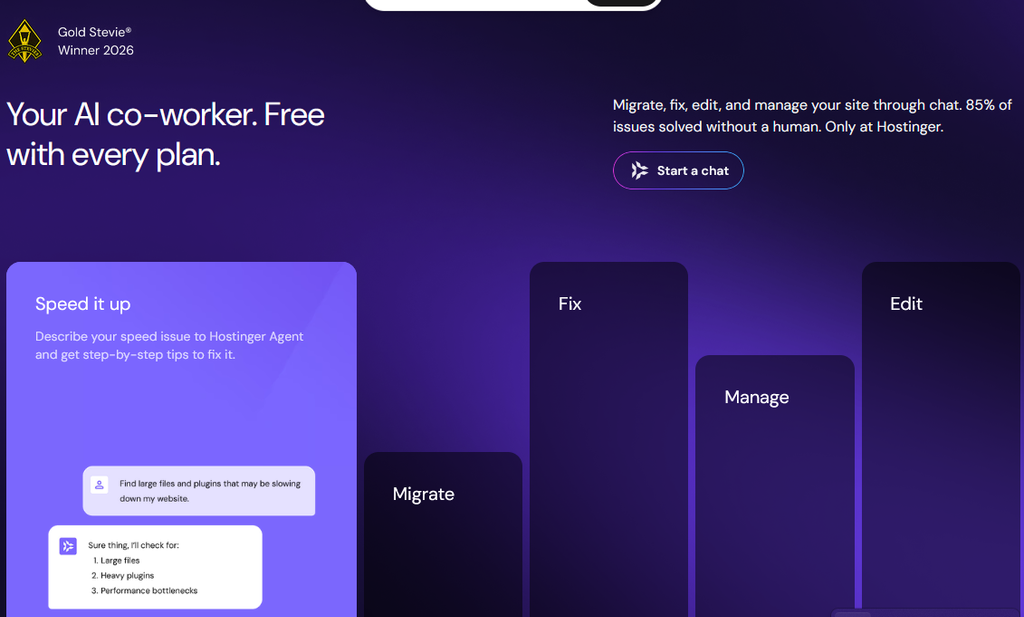
Beyond site generation, Hostinger includes an AI assistant called Hostinger Agent with every plan, which is meant to help with day-to-day account tasks through chat: fixing common errors, walking through a migration, adjusting plugins, or explaining a performance issue in plain language rather than technical jargon. Higher plans get more AI Builder credits and access to more advanced agent capabilities.
There’s also AI-assisted email marketing for building and sending campaigns, along with smaller AI utilities like a logo generator, business name generator, and domain name generator to help with the earliest “what do I even call this” stage of a project.
Worth saying plainly: these tools speed up the mechanical parts of building a site, but they’re not a substitute for actually understanding your audience, your content, or your business. AI can hand you a working draft fast — it won’t write your strategy for you.
Performance and Speed
Hostinger’s shared and cloud plans run on SSD or NVMe storage depending on the tier, with NVMe on higher plans generally translating to read faster/write speeds than older SSD or spinning-disk setups. The included CDN helps distribute static content closer to visitors, which can meaningfully reduce load times for an international audience.
Hostinger also operates data centers across multiple regions, so where your server is physically located can make a real difference in latency for your target audience — it’s worth picking a data center close to where most of your visitors are, if that option is available at signup.
That said, no host can guarantee a fast website on its own. How your site actually performs depends heavily on your theme, how many plugins you’re running, the size of your images, and how much traffic you’re getting. Hostinger gives you decent infrastructure to work with; the rest is still on you.
Security: Hostinger Review
Hostinger includes free SSL certificates on every plan, set up automatically at signup, along with free malware scanning to flag suspicious files. Backups—weekly, daily, or on-demand depending on your plan—act as a safety net if something goes wrong, whether that’s a bad plugin update or a compromised account.
Higher-tier plans add features like dedicated IP addresses and more frequent backup restore points. Agency-focused plans also include per-site access sharing and unbranded client dashboards, which matters if you’re managing sites on behalf of clients and don’t want them staring at your own account settings.
None of this makes a site immune to attack—no host can promise that—but the baseline security measures are reasonable for the price point, and they’re not locked behind a pricier tier the way some competitors handle SSL or backups.
Hostinger offers 24/7 support, with live chat as the primary channel and priority support included on paid plans. There’s also a fairly extensive knowledge base, written tutorials, and a library of video walkthroughs through Hostinger Academy, plus an active community on Discord and Reddit if you’d rather ask real users than read documentation.
The AI-powered Hostinger Agent handles a meaningful share of common questions and troubleshooting steps before you need a human agent, which can be genuinely convenient for quick issues at 2 a.m. That said, AI-first support isn’t for everyone — if you strongly prefer talking to a person for anything beyond the basics, know that the human live-chat team is there, but the first line of contact increasingly leans on the AI assistant.
WordPress Hosting: Hostinger Review
Hostinger offers managed WordPress hosting with guided installation, LiteSpeed servers, caching, automatic WordPress updates, SSL, backups, migration tools, staging/developer features, and AI assistance.
Business/Cloud-level WordPress services can also use Hostinger Agent to perform tasks through natural-language instructions, including creating content and helping manage WooCommerce. Hostinger also supports WordPress Multisite.
Choose WordPress over Website Builder when you want the WordPress plugin ecosystem, advanced blogging, WooCommerce flexibility, more control over SEO/plugins, or portability between WordPress hosts.
Choose Website Builder when simplicity is more important than that flexibility.
Hostinger Business Email
Hostinger lets businesses create addresses such as:
info@example.com
support@example.com
sales@example.com
Its standalone Hostinger Mail lineup currently starts at $0.39/mailbox/month for a 48-month Starter purchase, while Standard starts at $0.99 and Premium at $1.99. Renewal prices are higher. Storage is 5 GB, 20 GB, and 50 GB per mailbox respectively.
Mail includes spam/virus/phishing protection, forwarding, aliases, Webmail, external email-client support, and increasingly AI-powered writing, search, summaries, and replies.
Backups: Hostinger Review
Backup frequency is plan-dependent.
Premium currently includes weekly backups. Unlimited lists daily backups and easy restoration, while Cloud Startup includes daily and on-demand backups. Hostinger also provides restore/download tools for supported hosting types. Do not assume every plan includes daily or manual backups
Free Website Migration
Hostinger currently offers unlimited free website migrations with eligible hosting plans.
WordPress migration can be automated, while other open-source CMS or cPanel-based migrations may take longer. Hostinger says the existing site remains available during migration, although DNS propagation afterward can potentially create a period of disruption.
Closed platforms such as Wix, Squarespace, and Shopify generally cannot simply be migrated server-to-server.
VPS Hosting: Hostinger Review
A VPS gives you isolated resources and much more server-level control than ordinary managed hosting.
Current KVM plans start at:
- KVM 1: $6.49/mo — 1 vCPU, 4 GB RAM, 50 GB NVMe, 4 TB bandwidth
- KVM 2: $8.79/mo — 2 vCPU, 8 GB RAM, 100 GB NVMe, 8 TB bandwidth
- KVM 4: $12.99/mo — 4 vCPU, 16 GB RAM, 200 GB NVMe, 16 TB bandwidth
- KVM 8: $25.99/mo — 8 vCPU, 32 GB RAM, 400 GB NVMe, 32 TB bandwidth
Hostinger also provides weekly backups, firewall management, an AI Web Terminal, public API access, and full root access.
VPS is appropriate for developers, custom applications, automation, higher-resource projects, and unusual server stacks. It is not the best starting point for someone who simply wants a basic blog or business site.
Node.js and Developer Features
Hostinger now supports Node.js applications on Business-equivalent/eligible web hosting and Cloud plans, including deployment from GitHub, file upload, and Hostinger Connector workflows.
Traditional hosting also provides tools including PHP management, Git, SSH, WP-CLI, SFTP, MySQL/database management, cron jobs, and staging where supported. Developers requiring unrestricted server configuration should look at VPS instead.
Hostinger AI Website/App Creation
Hostinger AI Builder lets you describe what you want and have AI generate a website or web application.
Possible projects include portfolios, business websites, ecommerce stores, membership sites, SaaS landing pages, booking platforms, dashboards, blogs, and interactive web apps.
The workflow is essentially:
Idea → prompt → AI generation → visual/prompt-based editing → testing → domain → publishing.
Paid AI Builder plans also support downloadable code, while third-party APIs can be integrated into suitable projects.
SEO and Marketing Tools
Hostinger’s ecosystem includes AI SEO, Google Analytics, Google Ads, Google AdSense, Google Tag Manager, Meta Pixel, WhatsApp, Hotjar, and Hostinger Reach email marketing integrations. AI Builder also advertises Google and AI-search visibility tools.
These tools can help measure visitors, conversions, advertising performance, user behavior, email engagement, and search visibility—but they do not guarantee rankings or traffic.
Customer Support
Hostinger offers 24/7 support, with live chat as the primary channel and priority support included on paid plans. There’s also a fairly extensive knowledge base, written tutorials, and a library of video walkthroughs through Hostinger Academy, plus an active community on Discord and Reddit if you’d rather ask real users than read documentation.
The AI-powered Hostinger Agent handles a meaningful share of common questions and troubleshooting steps before you need a human agent, which can be genuinely convenient for quick issues at 2 a.m. That said, AI-first support isn’t for everyone — if you strongly prefer talking to a person for anything beyond the basics, know that the human live-chat team is there, but the first line of contact increasingly leans on the AI assistant.
Does Hostinger Offer a Money-Back Guarantee?
Yes. Hostinger’s official refund policy currently offers a 30-day money-back guarantee on standard hosting plans, SSL certificates, backups, email hosting, and priority support, among other products.
Here’s how it actually works in practice:
- You have 30 days from the date of your transaction to cancel and request a refund on eligible products.
- VPS hosting plans are refundable under the same 30-day window, but with an added condition: more than 180 days must have passed since your last VPS refund if you’ve requested one before.
- Some products are excluded entirely from refunds—this includes domain name renewals, privacy protection, AI Builder credits, and a handful of other add-ons —so it’s worth checking the specific product’s refund terms before assuming everything is covered.
- Payments made using cryptocurrency aren’t eligible for a refund because those transactions are irreversible.
- Free domains included as part of a hosting bundle aren’t refunded separately if you cancel the hosting plan itself.
Before requesting a refund, double-check which product you’re canceling and read the specific terms tied to it—the general 30-day window applies to hosting itself. Still, add-ons and domains follow their own rules. GET INSTANT ACCESS:
Hostinger Pros and Cons
Pros:Genuinely low entry pricing, especially on longer-term plans
Free domain, free SSL, and free migration bundled into most plans.
AI Builder and Hostinger Agent meaningfully speed up building and managing a basic site.
24/7 support with live chat and a large self-serve knowledge base
Scales from beginner shared hosting up to VPS and agency hosting without switching providers.
0% transaction fees on ecommerce sales
Cons:
• Renewal prices are considerably higher than the promotional rate, and the biggest discounts require a 48-month commitment.
• hPanel replaces cPanel entirely, which may require a short learning curve for admins used to cPanel
• VPS hosting is unmanaged, so you’re responsible for server maintenance and updates
• The refund policy doesn’t cover AI Builder credits and a few other add-ons.
• Heavier AI-first support may not suit users who strongly prefer human agents from the start.
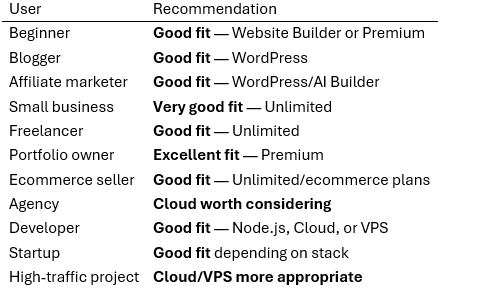
Who Should Use Hostinger?
Is Hostinger Worth It?
Overall, Hostinger earns its reputation as a budget-friendly, beginner-friendly host, but it’s not without trade-offs. The features you get for the promotional price — free domain, SSL, migration, decent backup frequency, and an increasingly capable set of AI tools — are genuinely useful and not just marketing filler. The 30-day money-back guarantee gives you a reasonable window to test the platform without much financial risk. Where it asks for a bit of caution is renewal pricing. If you’re not planning to commit to a multi-year term, the ongoing cost is less remarkable than the headline number suggests. It’s also worth remembering that no host — Hostinger included — can guarantee your site will rank well, attract traffic, or generate income. Hosting is the foundation your site runs on, not the strategy behind it.
Final Verdict: Hostinger Review
Hostinger delivers what it promises. You get affordable, beginner-friendly hosting with a useful range of AI tools. Its support system also covers different levels of help. You can start with self-service documentation. Live human support is available when you need it.
Hostinger’s biggest strengths are accessibility and value. This is especially true at the entry level. The main thing to watch is the difference between promotional and renewal prices. Anyone signing up should consider future renewal costs in advance.
If you’re building your first website, Hostinger is worth considering. It’s also a good option for small business websites. You can use it to host a WordPress blog or a small online store.
However, Hostinger may not be the best fit for everyone. If you need fully managed enterprise infrastructure, consider other providers. The same applies if you’re heavily invested in a cPanel-based workflow. Compare your options before making a final decision.
Curious to see the current plans and pricing for yourself? Explore Hostinger’s hosting plans here and compare them with your budget and site plans before deciding